This feature is only available with **Premium** plan
Simplified backup allows to request synthesizer sound messages from your browser. Check [supported synths page](https://synthsonline.com/supported) that have the **Simplified backup** feature to know if your synthesizers support this feature.For accurate processing of messages **do not use or change any parameter of your synth** during this process
### Backup all banks This feature allows to request and backup all supported banks of a synthesizer at once from the browser. To start the backup 1. Click on **Backup supported banks** to start the backup [](https://wiki.synthsonline.com/uploads/images/gallery/2023-01/vnXimage.png) This will start the sound backup process. ### Backup selected banksThis feature is not supported on synthesizers that only have on bank
To start the backup: 1. Expand the **More options** section 2. Select the banks to backup [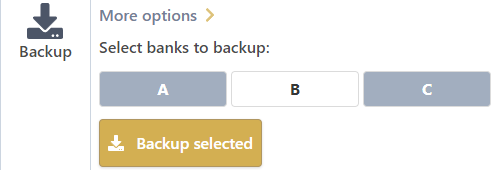](https://wiki.synthsonline.com/uploads/images/gallery/2023-01/dPNimage.png) 3. Click on **Backup selected** This will start the partial sound backup process. ### Backup progress Backup progress is displayed when banks are requested. Backup section is replaced by a progress bar until the end of the operation: [](https://wiki.synthsonline.com/uploads/images/gallery/2023-01/L0bimage.png) ### Location of imported messages Imported sound are available in a bank visible in the **Banks** menu section of your synthesizer, e.g. :[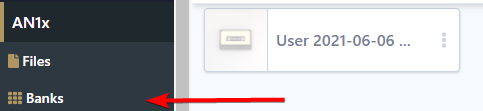](https://wiki.synthsonline.com/uploads/images/gallery/2023-01/q6Cimage.png)